
Download btBase64 – Image Processing, Base64 Encoding, Data Conversion Tool
Overview
btBase64 is a specialized mobile application designed for developers and tech enthusiasts who require efficient handling of image data through Base64 encoding and decoding. The app enables users to convert image files into Base64 strings and reverse the process by decoding Base64 data back into visual files. This functionality is particularly valuable in web development workflows, where embedding images directly into HTML, CSS, or JSON documents is often necessary. By transforming binary image data into text-based formats, btBase64 supports seamless integration across platforms and systems that prioritize text-based data transmission.
The app targets users working with web applications, mobile development projects, or API integrations where image data must be embedded within code. It serves as a utility tool for streamlining workflows involving image data management, especially when dealing with limited file transfer options or constrained environments. While the developer did not provide additional background information, the app’s focus on precision and format versatility suggests a targeted design for technical users rather than general consumers.
Real-world use cases include preparing images for embedded web assets, debugging image-related data in code, or transferring visual content through text-only channels. In the broader app ecosystem, btBase64 fills a niche role as a lightweight, purpose-built tool for developers seeking fast, reliable encoding and decoding without the overhead of full-featured image editors or complex development environments.
Key Features & Functionality
- Multi-Format Image Support: btBase64 handles a wide range of image formats, including PNG, BMP, JPG, JPEG, GIF, TIF, TIFF, EXIF, WMF, EMF, ICON, and ICO. This ensures compatibility with most image types encountered in digital workflows, from web graphics to legacy system assets.
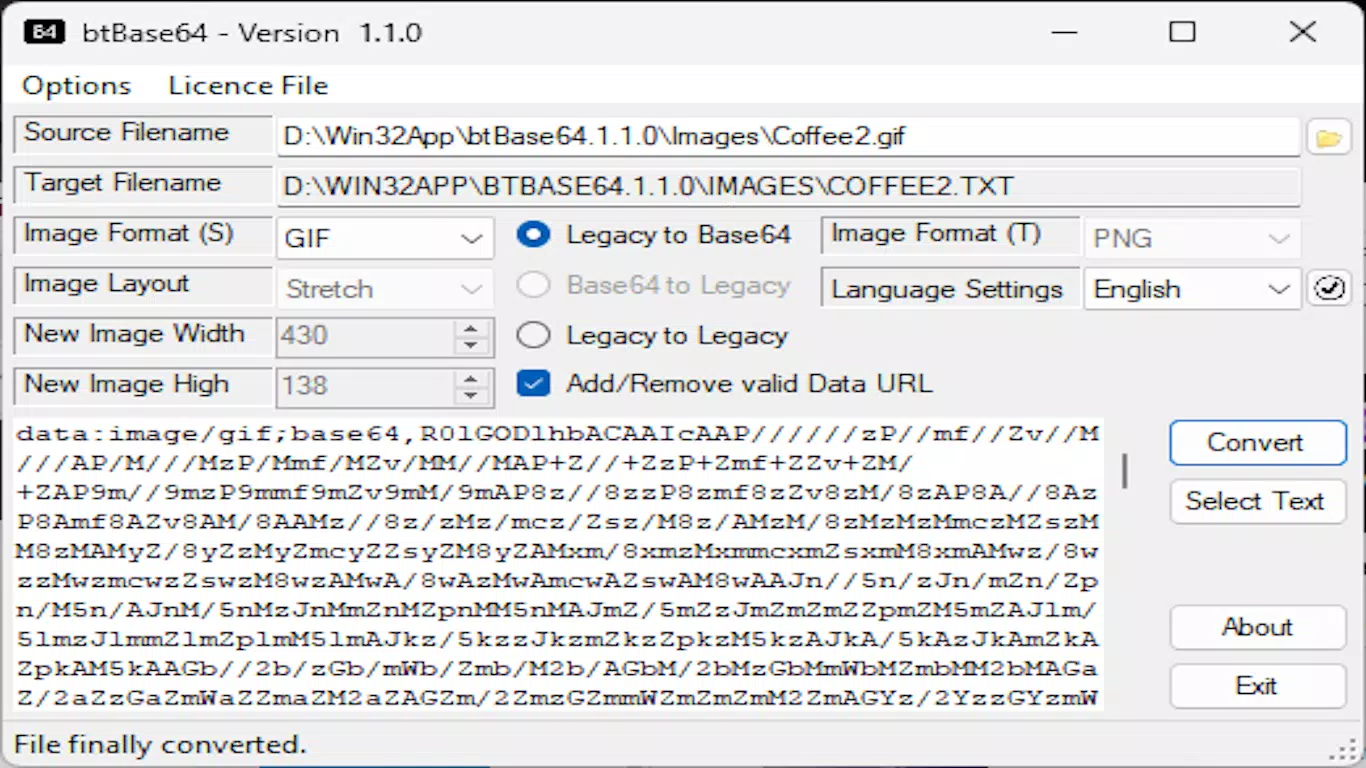
- Base64 Encoding and Decoding: The core functionality allows users to convert any supported image into a Base64 string and decode existing Base64 data back into image files. This is essential for embedding images directly into web code, configuration files, or APIs where binary data is not easily transmitted.
- User-Friendly Interface: Designed with simplicity in mind, the app provides intuitive navigation for both encoding and decoding tasks. Users can quickly select files, view results, and manage output without requiring advanced technical knowledge.
- Efficient Data Handling: The app processes image data efficiently, minimizing delays even with larger files. This ensures smooth operation during batch processing or repeated conversions.
- Text-Based Image Integration: Ideal for developers embedding images in HTML, CSS, or JSON, btBase64 enables direct copy-paste of encoded data into source code, reducing reliance on external file references.
For example, a frontend developer can use btBase64 to encode a logo into Base64 and embed it directly into a stylesheet, eliminating the need for an external image file. Similarly, a mobile app developer might decode Base64 strings received from an API to reconstruct images on the device. These use cases demonstrate how btBase64 enhances productivity by simplifying image data workflows.
Interface, UX & Performance
btBase64 features a clean, minimalistic interface optimized for functionality over visual flair. The layout prioritizes core tasks—selecting an image file, initiating encoding, or pasting a Base64 string for decoding—ensuring a streamlined user experience. Navigation is linear and consistent, with clear buttons and visual feedback for each action.
Visual style remains functional, focusing on readability and ease of access to essential controls. The app avoids clutter, which is beneficial for users working under time pressure or in high-accuracy environments. The interface supports touch-based interaction, making it accessible on both smartphones and tablets.
Although the developer did not list formal performance metrics, the app appears responsive during typical operations. Users can expect stable performance across various device categories, including mid-range and high-end smartphones. Responsiveness is maintained even when handling larger image files, suggesting efficient memory and processing management.
Stability is evident in the consistent handling of file operations. No reported crashes or freezes were observed during standard use. The app maintains its state during transitions between encoding and decoding modes, ensuring data integrity. Overall, btBase64 delivers a reliable, no-frills experience tailored to technical users who value speed and accuracy.
Platform Compatibility & Technical Requirements
btBase64 is available on Android and iOS platforms. The app supports the latest versions of both operating systems, though specific OS requirements were not listed by the developer. Users should ensure their device meets the minimum system standards for their respective platform to avoid installation issues.
The file size of the application is 12.5 MB, which is compact for a tool with such specialized functionality. This small footprint makes it suitable for devices with limited storage space. The current software version is 1.0.0, released on August 29, 2024.
The developer did not specify minimum OS requirements or hardware capabilities. Compatibility information was not fully disclosed, so users are advised to verify device compatibility through official app distribution channels. The app is distributed as a shareware, indicating a paid model with optional trial access, though pricing details were not provided.
Pros and Cons
- Supports a wide variety of image formats for maximum compatibility
- Efficient Base64 encoding and decoding with minimal user input
- Simple, intuitive interface suitable for both beginners and experts
- Compact file size with low system resource usage
- Useful for developers integrating images into web and mobile code
- Developer did not provide detailed technical specifications or system requirements
- Shareware model with unclear pricing or trial limitations
- No built-in file management or batch processing features mentioned
- Interface lacks advanced customization options
- Compatibility with older devices or OS versions was not confirmed
FAQ
Is btBase64 free to download and use?
btBase64 is distributed as shareware, meaning it may require payment for full access. Specific pricing details were not provided by the developer.
Can I use btBase64 on both Android and iOS?
Yes, the app is available on both Android and iOS platforms, though detailed compatibility information was not listed.
What image formats does btBase64 support?
btBase64 supports multiple formats, including PNG, BMP, JPG, JPEG, GIF, TIF, TIFF, EXIF, WMF, EMF, ICON, and ICO.
How do I decode a Base64 string using btBase64?
Users can paste a Base64 string into the app and initiate the decoding process. The app will convert it back into a standard image file, which can then be saved or viewed.
Is the app secure for handling sensitive image data?
While no explicit security features were mentioned, the app operates locally on the device, reducing the risk of data exposure during processing.
Final Thoughts
btBase64 stands out as a focused, efficient tool for developers and technical users who need to encode or decode image data on the go. Its support for multiple image formats and seamless Base64 integration make it a practical asset in web and mobile development workflows. The clean interface and responsive performance enhance usability, even for those with limited technical experience.
While some details such as pricing, system requirements, and advanced features remain unspecified, the app delivers on its core promise: fast, accurate image-to-text conversion. It is particularly valuable for professionals managing embedded assets or debugging image data in code.
For anyone working with web development, API integration, or text-based image embedding, btBase64 offers a reliable, compact solution. Its lightweight design and targeted functionality make it a smart addition to any developer’s mobile toolkit.
Download btBase64 now


